PowerScripting Podcast 85 - Eventing, Transactions, Security

Last week, I dropped by to be interviewed on the PowerScripting Podcast. We chatted about providers, eventing, transactions, security, and a whole slew of V2 improvements that you probably didn’t know about!

Give it a listen: http://powerscripting.wordpress.com/2009/09/27/episode-85-lee-holmes-talks-about-v2/

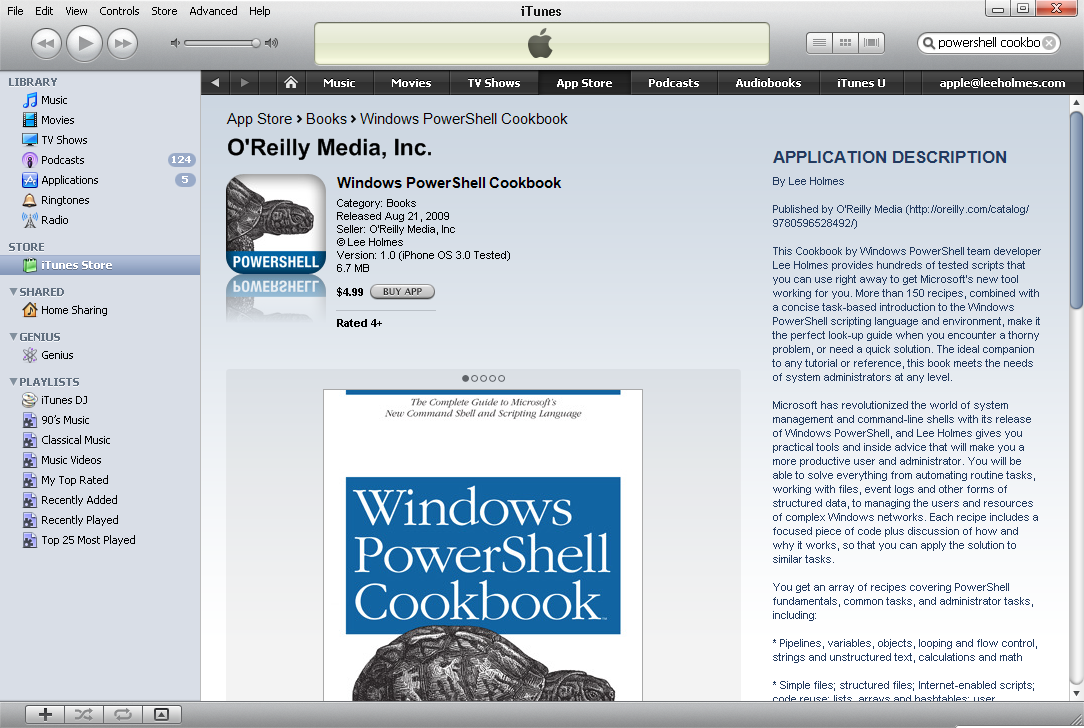
PowerShell Cookbook Now Available on iPhone

Call me as shocked as anybody, but the iPhone app store now has a new entry:

image

Although I can’t find any official information about it on the rest of the internet, O’Reilly has teamed up with Lexcycle (authors of the Stanza iPhone book reading application) to create iPhone applications for many of the top O’Reilly cookbooks.

Just when you thought the “PowerShell Pocket Reference” was a good value per pound, this one comes in at a net weight of zero! Definitely a pocket-sized reference worth carrying around.

PowerShell equivalent of NET HELPMSG

Sometimes, people ask, “What’s the equivalent of NET HELPMSG” in PowerShell?

NET HELPMSG is probably the easiest to remember (and works in PowerShell of course,) but PowerShell improves the experience a bunch by way of the .NET Framework.

Suppose you get error 0x80070652 from an installer:

C:\Users\leeholm>net helpmsg 0x80070652
The syntax of this command is:

NET HELPMSG
message#

Oops, it doesn’t support hex. You need to take the last 4 digits:

More advanced HTTP scripting: Facebook Photo Album Downloader

I wanted to download a photo album from Facebook, but of course there’s no simple API or option to do that. Searching the internet finds a couple of options (a Firefox plugin, a Facebook app,) but I couldn’t seem to find anything standalone.

This gives another great opportunity to talk about advanced HTTP scripting in PowerShell. We’ve talked about it in the past (here: http://www.leeholmes.com/blog/AdvancedHTTPASPNetScriptingWithPowerShell.aspx,) so this script introduces some new techniques.

Auto-Updating With No Reboot

Despite being a fan of security, I’ve always run Windows Update in “Download and Notify” mode for all of my machines. Having Windows Update reboot my machine without warning at 3:00 AM is just too destructive.

This has two negative effects:

- Security patches that don’t require a reboot are needlessly postponed.
- Programs that auto-update frequently via Microsoft Update turn into a permanent task-bar nag that you have updates to install.

Why So Secure?

After working with PowerShell for awhile, then starting to write scripts, you quickly learn about PowerShell’s Execution Policy and other security features. You might even throw up your hands, and ask, “Why is this configuration so HARD? Why can’t it be as easy as VBS and Perl?” You can double-click on a VBS or CMD script and have it run automatically. Those scripts could invoke PowerShell anyways, so why put all this effort into security?

Get-Help -Online

In CTP2 of PowerShell v2, we added a new parameter to Get-Help: Online. This parameter lets help authors declare an “online version” of their help topic, which PowerShell then launches with your default browser. For the PowerShell cmdlet help topics, we redirect to the excellent (and more frequently updated) online cmdlet help topics: http://technet.microsoft.com/en-us/library/dd347701.aspx.

PowerShell supports online help content for both MAML-based help topics (http://msdn.microsoft.com/en-us/library/bb525433(VS.85).aspx, http://blogs.msdn.com/powershell/archive/2006/09/14/Draft-Creating-Cmdlet-Help.aspx, http://blogs.msdn.com/powershell/archive/2008/12/24/powershell-v2-external-maml-help.aspx) and inline help comments (http://technet.microsoft.com/en-us/library/dd819489.aspx.)

To add support for the –Online parameter to your own cmdlet help, add a maml:navigationLink element with a maml:uri node to the maml:relatedLinks section in your MAML help. The help system uses the first navigation link that contains a URI as the target for the link.

Things more likely to kill you than Swine Flu

There are a few. Based on worldwide numbers (160 confirmed deaths, 3000 “suspected” cases)

  • Falling out of bed (900 confirmed deaths)
  • Falling down the stairs (1,690 confirmed deaths)
  • Big storm (874 confirmed deaths)
  • Drinking binge (346 confirmed deaths)

Of course, the statistic left out by the news

  • Normal flu (36,000 confirmed deaths per year)

http://www.nsc.org/research/odds.aspx

PowerShell Audio Sequencer

I got forwarded an addictive interactive sequencer yesterday (http://lab.andre-michelle.com/tonematrix) and was immediately hooked. I asked an internal mailing list if there was any kind of hardware that lets you do this kind of thing on the couch, and got the response – “you mean MIDI?” That’s close, but it is closer to a very simplified sequencer.

I play classical guitar… even being a fan of electronic music, I had never seen a sequencer used, or tried to make anything in one. I’m sure some researcher out there would love to have me for a “out of touch with reality” anthropology study.

More Tied Variables in PowerShell

Ibrahim just posted something to the PowerShell blog about how to create tied variables in PowerShell. If you extend this approach with script blocks, you have a very powerful dynamic scripting technique.

PS C:\temp> cd \temp
PS C:\temp> New-ScriptVariable.ps1 GLOBAL:lee { $myTestVariable } { $GLOBAL:myTestVariable = 2 * $args[0] }
PS C:\temp> $lee
PS C:\temp> $lee = 10
PS C:\temp> $lee
20
PS C:\temp> New-ScriptVariable.ps1 GLOBAL:today { (Get-Date).DayOfWeek }
PS C:\temp> $today
Wednesday
PS C:\temp> New-ScriptVariable.ps1 GLOBAL:random -Get { Get-Random } -Set { Get-Random -SetSeed $args[0] }
PS C:\temp> $random
1740776676
PS C:\temp> $random
1507521897
PS C:\temp> $random = 10
PS C:\temp> $random
1613858733
PS C:\temp> $random = 10
PS C:\temp> $random
1613858733

He alluded to it in the post – here is the full text of the script: