First Solo - and a Ripped Shirt to Prove It

Last night, I flew my first half-hour as Pilot in Command of N8756C, a 1977 Piper Warrior. In flying, a pilot’s First Solo is a huge milestone. After hours of training and ground study, you finally take to the air on your own.

FirstSolo

The most difficult part of flying is getting back down, so the First Solo is three takeoffs and landings – about half-an-hour in the traffic pattern. It seemed to be the flight that would never come, though.

Importing and Exporting Credentials in PowerShell

One question that comes up fairly often when dealing with (or writing!) secure cmdlets is how to properly handle usernames and passwords. The solution there is to use (or make) the -Credential parameter of type PSCredential. A PSCredential object helps ensure that your password stays protected in memory, unlike cmdlets that accept a straight username / password combination.

If a parameter is of type PSCredential, PowerShell supports several types of input:

Flight Training, Episode 2

After what seems like an eternity, I finally got to start my official flight training. As a Canadian (AKA “Alien,”) applying for flight school also means getting your fingerprints taken and being put in a special registration system. My training permission cleared late last week, so I booked my first lessons as soon as I could. In fact, for a government agency, the flight registration process was surprisingly efficient. Finding a place to get TSA-approved fingerprints outside of work hours? Well, that’s a different story.

PowerShell's Noble Blue

Once in awhile, you’ll see a PowerShell screenshot that is still black and boring like the traditional cmd.exe prompt. Other times, you’ll see the fancy blue window you’ve come to love. Why the difference? And if you’re suffering from black window syndrome, what can you do about it?

image

Before shipping Version 1, our marketing and design teams set to make the PowerShell window a unique and marquee experience. What form did this take?

Generating Code Coverage from PowerShell Scripts

If you’re testing your PowerShell scripts (manually or automatically,) one of the first questions you’ll end up asking yourself is, “did I test enough?”

This is common problem in all of software development. To the rescue is a simple metric known as “Code Coverage” – a measure of how much code you exercised during the testing of that code.

However, the measurement is just the end result – you need a tool to get you there. When it comes to measuring code coverage in PowerShell scripts, though, there simply aren’t any tools yet.

First Steps in Flight

For a long time, I’ve been thinking about learning to fly. One of the random long-distance-drive conversations I like to have is, “What job would you do if you were for some reason prevented from doing what you do now?” For me, flying has always been something I would entertain, but only romantically. The downsides to doing it professionally are huge – the time away from your family and strict seniority-based promotions being the two largest factors. So instead, I wanted to reward myself with flying lessons the next time I thought it was appropriate. A King of the Hill episode, of all things, changed my mind on that.

PowerShell Crash - Your Help Needed

A few years ago, we experimented with a “Live” version of Get-ChildItem that retrieved elegant textual context-based advertisements from the internet as you used PowerShell.

This has been very successful, but unfortunately, a small subset of our trial user population has experienced crashing behaviour due to these new shell modifications. We have been unable to reproduce the issue in our labs, so the users in question have sent us screen casts of the crash. Even still, we’ve been looking at the code so long that we still can’t confirm the problem.

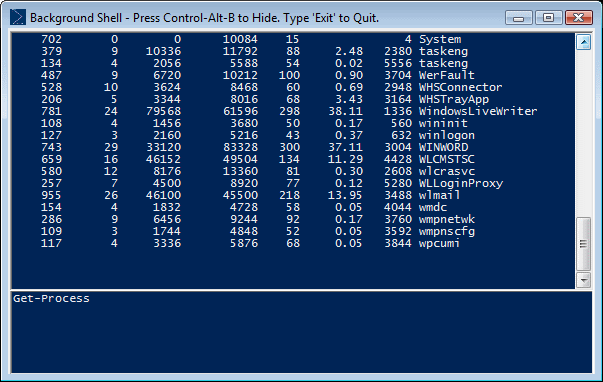
BgShell - Background Shell

BgShell is a proof of concept PowerShell host that explores the idea of PowerShell as a background Macro program.

Realtime Syntax Highlighting in your PowerShell Console

[Download: http://www.leeholmes.com/projects/SyntaxHighlight/Start-Colourizer.zip]

In our most recent CTP, we exposed PowerShell’s parsing and tokenizing API for the great benefit of ISVs and hobbyists alike. As an initial demonstration of it, Show-ColorizedContent let you display nicely formatted code listing in your console:

image

While this is very cool, we can actually push the parsing and tokenizing API even further. How about real time?

The first time I got this working, I actually giggled a little with glee. We’re all so used to instant gratification when it comes to syntax highlighting that we sometimes forget about it. Until you drop into an environment that doesn’t support it – such as Notepad.exe or the PowerShell console. But with enough chewing gum and rubber bands, we can at least bring it into the PowerShell console.

PowerShell Cookbook Sample Chapter: Environmental Awareness

When O’Reilly put up the overview page for the Windows PowerShell Cookbook, the sample chapter was originally “Looping and Flow Control.” While a useful chapter in its own right, it didn’t really highlight the solution-oriented focus the book takes.

They’ve now updated the sample chapter to one much more representative: Environmental Awareness.

The goal of this chapter is to help you work with the global environment (environment variables and common system paths,) and script’s environment (its location, name, and invocation info.)