Note Trainer - Musical Staff Trainer

I wrote Note Trainer to help me learn guitar. It shows a random note on the treble cleff staff, delays a bit, then plays the actual note. You play the note as soon as you see it, then decide for yourself if you played the right one :)

Precision Computing Turns One

It was a year ago now that Precision Computing, in its current form, opened its doors.  I’ve been writing something blog-like for longer, but it previously involved updating the HTML by hand :)

It’s been an interesting year – one in which we’ve seen the PowerShell community blossom from a group of passionate BetaPlace users, to a much larger and more diverse community.  We’ve played with a handful of new releases, experienced a long-awaited name change,  and perhaps most importantly – learned about PowerShell’s official release plans.

Cafe Artigiano in Vancouver

On a recent trip to Vancouver, I accidentally stumbled into a cafe called Caffe Artigiano right downtown (on Hornsby street,) and was extremely impressed.  The walls are decorated with pictures of gorgeous Latte art, and the drinks are stellar.  It turns out that the place is the home of the Canadian Barista Champion for three years running!

And with drinks like this?  It makes me want to go back to working for a coffee shop :)

SecureStrings in PowerShell

When you use any string in the CLR, it retains that string so that it can efficiently reuse it later.  Unlike most .Net data, unused strings persist even through garbage collection cycles.  While this data is in memory, there is always the chance that it could get captured in a crash dump, or swapped to disk in a paging operation. Because some data (such as passwords, and other confidential information) may be sensitive, the .Net framework includes the SecureString class – a container for text data that the CLR stores in memory in an encrypted form.  Code that needs to interact with the plain text data inside of a SecureString does so as securely as possible.

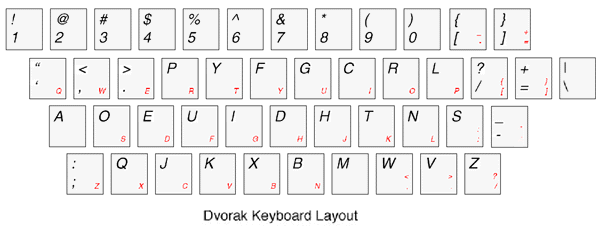
How do I learn the Dvorak keyboard layout?

Well, it looks like Scott had to go and drum us Dvorak nuts out of the ground.  It brought up a good question, though – how do you go about learning the Dvorak keyboard layout?

The Dvorak keyboard layout, for those that do not know, was designed from the start to be maximally efficient.  It places the most common letters on the home row, and arranges the letters to maximize both the balance and alternation between hands while typing.  There are some that disagree with its effectiveness, but those looking to learn Dvorak typically aren’t part of that crowd.

Shortcut to Select the Next Edit Box in Internet Explorer

One of my pet peeves with Internet Explorer comes as I read a site or navigate the internet with the keyboard – but then have to use the mouse to click on a single, isolated edit box.  One solution is to use the ‘Tab’ key until I reach the edit box, but a page full of links can often require 50 or more presses of the ‘Tab’ key to get the edit box.

Nothing solves everything – PowerShell and other technologies

Raymond recently wrote a post titled, “A new scripting language doesn’t solve everything.”  In that post (and in a previous one,) he points out that backwards compatibility is extremely important for cmd.exe (with itself,) and for PowerShell (with existing cmd.exe scripts.)  More importantly, the point is that PowerShell doesn’t solve everything:

Shipping a new command shell doesn’t solve everything either. For one thing, you have to decide if you are going to support classic batch files or not. Maybe you decide that you won’t and prefer to force people to rewrite all their batch files into your new language. Good luck on that.

Accessing Environment Variables in PowerShell

In a recent comment, David asked how to access environment variables in PowerShell.  This is something that we normally just document explicitly: $env:Variable. 

However, that explicit documentation is actually a shortcut for a feature you may not know about.  It’s a little like dividing fractions – you can do it without ever knowing why it works, just that it works.  Of course, it’s nice to be able to explain why.

As you may know, the ‘$’ character is the way that we access variables in PowerShell.  The probing student might then ask, “Why can we access environment variables the same way we access normal variables.  Isn’t ‘Env:’ the environment provider?  And specific environment variables are children of it?”

Running PowerShell Scripts from Cmd.exe

One of the things that people often struggle with when they try to use PowerShell scripts as targets of Scheduled Tasks, or launch PowerShell scripts from cmd.exe is the following error message:

C:\Program Files\Windows PowerShell\v1.0>powershell.exe “c:\temp\has space\test.ps1”
‘c:\temp\has’ is not recognized as a cmdlet, function, operable program, or script file.
At line:1 char:12
+ c:\temp\has  «« space\test.ps1

(By the way, you can speed this up by using the -noprofile parameter to powershell.exe)

Blogging From PowerShell - Editing Posts With the MetaWeblog API

In the last post, I mentioned that I wanted to update all of my old Monad posts to include a reference to Windows PowerShell.  That way, users who use the “PowerShell” keyword to search for a topic I’ve covered (under the Monad codename) can still find it.

I provided a script to get all of the posts from a MetaWeblog-enabled host, so our next goal is to actually make the changes.